YouTube pre roll video specs

YouTube pre-roll advertising is not just about great content or visuals; it also depends heavily on the underlying technical factors. If a video does not meet the correct standards, the ad may suffer from restricted distribution or inconsistent display across different devices. Therefore, the youtube pre roll video specs should be viewed as a foundational requirement, not just a perfunctory checklist. From resolution, aspect ratio, codec, and audio to file size, every detail directly impacts approval likelihood and the viewer experience. By mastering the youtube pre roll video specs, advertisers can be more proactive during the production phase, avoiding repetitive revisions and keeping the campaign rollout on schedule.
What requirements do youtube pre roll video specs need to meet?
For a Pre-roll advertising campaign to achieve maximum performance, compliance with YouTube’s technical standards is mandatory. A well-optimized video not only ensures a swift approval process but also enhances the display experience across all devices. Preparing assets based on optimal parameters ensures sharp visuals, fast loading speeds, and minimized disruptions, thereby increasing customer retention and optimizing the cost-per-view (CPV) for the business.
Common Aspect Ratios and Resolutions
YouTube is a multi-device platform, requiring ad videos to be flexible for perfect compatibility, from mobile screens to Smart TVs. The standard and safest aspect ratio is 16:9 (horizontal) with a recommended resolution of 1080p (1920×1080) or higher to ensure clarity. However, with the mobile-first trend, businesses should also prepare 9:16 (vertical) or 1:1 (square) formats. The system will automatically select the most suitable ratio to fill the user’s screen space, significantly enhancing aesthetics and engagement rates.
Standard File Formats and Codecs
Choosing the right file format ensures that YouTube’s upload and processing run smoothly while maintaining color fidelity. The top recommended file format is .MP4, using the H.264 compression standard (video codec). This is the optimal compression standard that balances high image quality with a lightweight file size, ensuring the ad plays immediately without lagging. The Frame rate should remain stable at 24, 25, or 30 FPS to provide the most natural motion for viewers.
Audio Specs Impacting Approval
Audio is a decisive factor in the emotion and professionalism of an ad, and it is also a critical criterion in the automated moderation round. Videos should use the AAC-LC audio format with a Sample rate from 44.1 kHz to 48 kHz. A key point to note is that the average volume level should be standardized at approximately f-14 LUFS. Audio that is too loud and jarring or too quiet may prompt the system to adjust your audio quality downward, affecting the delivery of your core message from the very first seconds.
Technical Constraints Directly Impacting Distribution
In Google’s advertising system, algorithms not only evaluate content but also scan deep into the file’s technical structure to decide distribution priority. Videos that violate size or duration constraints are immediately restricted from high-quality auctions or even rejected. Understanding these limits helps advertisers avoid wasting budget and ensures the campaign reaches the maximum target audience without interruption from system technical errors.
Video Size and Duration Limits
Size and duration are two factors that directly control loading speed and user experience on the YouTube platform. Although the system accepts files up to 256 GB, for Pre-roll ads, experts recommend optimizing the file size to under 10MB to ensure the ad plays instantly without latency, especially on mobile devices with unstable connections.
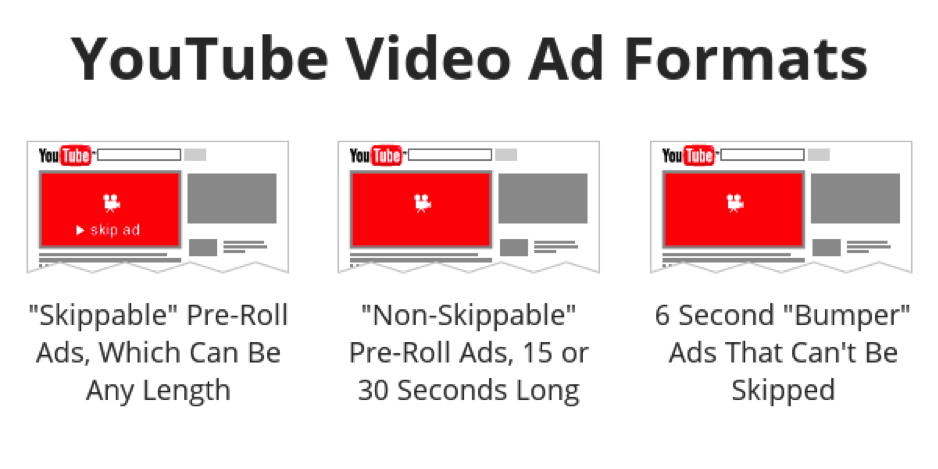
Regarding duration, Unskippable ads are strictly bound between 15 – 20 seconds. If your video exceeds this limit by even one second, the system will automatically remove this format from the setup options. For Skippable ads, while there isn’t a strict hard limit, the optimal duration is usually between 30 – 60 seconds; excessively long videos will reduce the view-through rate, driving the CPV bid higher than the market average.
How YouTube Handles Non-compliant Display Videos
When an ad video does not meet the technical specs for resolution or aspect ratio, the system automatically performs technical adjustments to maintain the user interface. The most common phenomenon is “Pillarboxing” or “Letterboxing”—where YouTube inserts black bars on the sides or top/bottom of the video to fill the player. This narrows the message display space, making the ad look unprofessional and significantly reducing visual impact.
Furthermore, YouTube applies Adaptive Bitrate Streaming to handle incompatible configurations. If the frame rate or encoding is sub-standard, the system will force the display quality down to the lowest level (360p or 480p) to maintain the stream. This leads to blurry, pixelated images on large screens like PCs or TVs, directly harming brand reputation and lowering the click-through rate of the entire campaign.
How to Prepare Videos to Avoid Technical Errors During Implementation
The video asset preparation process is the most crucial step to ensure a flawless Pre-roll campaign. A small error in file configuration can lead to ad rejection or poor display quality, wasting the business’s budget and time. To optimize distribution, advertisers must establish a strict control process from post-production to the moment the video is uploaded to the system, eliminating technical risks during the bidding process.
Check Specs Before Uploading
Reviewing technical specs directly on the final file is the first layer of protection for the campaign. Before uploading, confirm the video uses H.264 compression and the .MP4 format for absolute compatibility with Google’s data processing algorithms. An important note is that the frame rate must be stable, usually at 24, 25, or 30 FPS; using a variable frame rate can cause audio and video to go out of sync. Additionally, double-check the volume level to ensure it does not exceed the -14 LUFS threshold, ensuring smooth audio playback without system intervention.
Syncing Between Source and Export Files
Discrepancies between the source video edited in software and the final exported file are common causes of display errors like pixelation or incorrect aspect ratios. Advertisers should maintain resolution consistency; for example, if the source file is 1080p (1920×1080), ensure the exported ad file keeps these specs rather than using upscaling, which only increases file size without improving actual quality.
Additionally, syncing the aspect ratio is vital to avoid unwanted black bars. If the video was shot in 16:9 horizontal format, ensure the “safe zone” for important messages and call-to-action buttons stays within the optimal display range.
Contact Info
We provide services google ads account for rent nationwide, and with a team of experienced and qualified staff who both support advertising and can directly perform Facebook advertising if you need. Contact us via phone number.
Frequently Asked Questions
This is due to a Bitrate that is too low or an unsuitable Encoding Profile. For 1080p video, you need to ensure a stable Bitrate between 8 – 12 Mbps. If the Bitrate is set too low to reduce file size, when YouTube re-encodes it, pixel blocks will break during high-detail or high-motion scenes. Prioritize using “2-pass encoding” settings to optimize image data.
YouTube has default overlays like the “Skip Ad” button, channel name, and CTA cards that overlay the video. To avoid losing information, you must keep critical content (text, logos) within a 20% safe zone from the top, bottom, and especially the bottom-right corner. A small tip is to always place core messages in the center or slightly to the left so they aren’t covered by player controls on both mobile and desktop.

