Google shopping ads shopee
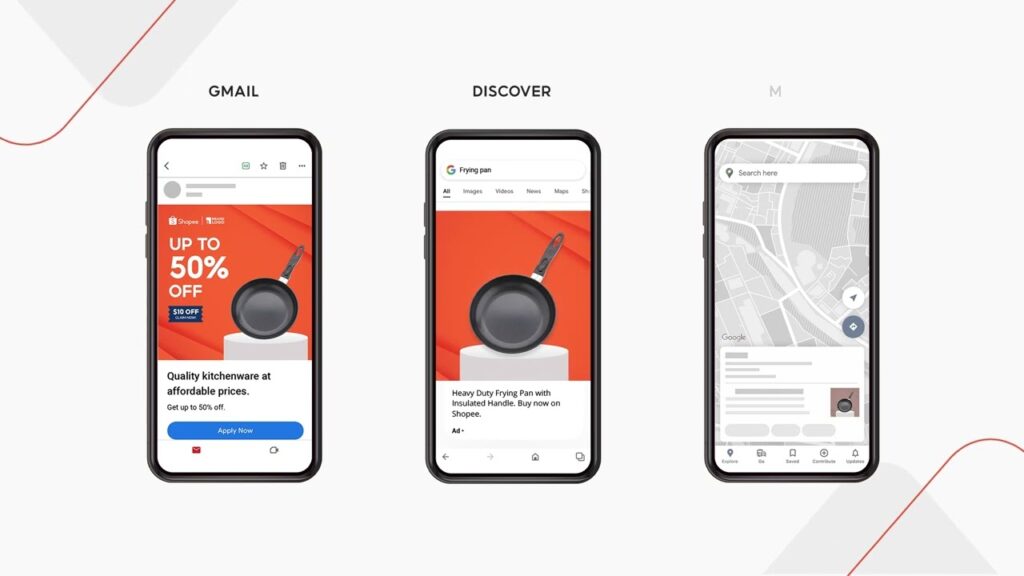
Modern shoppers habitually search for product names on Google to compare prices before making a final purchase decision. Deploying google shopping ads shopee allows your products to appear right at the top of search result pages, complete with clear product imagery, pricing, and trusted store badges. The visual appeal of google shopping ads shopee delivers significantly higher click-through rates compared to traditional text-only ads. RentAds helps you optimize your product data feed to ensure your store stands out directly against key competitors.
How Are Google Shopping Ads Shopee Displayed?
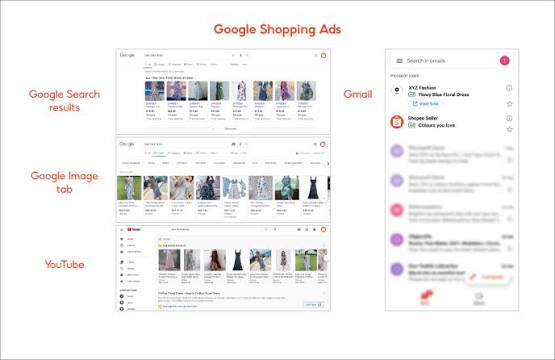
Google Shopping Ads differ fundamentally from text-based Search Ads in their presentation: instead of relying strictly on headlines and text snippets, they display rich product imagery, exact product names, pricing, and seller details directly within Google Search results. This allows prospective buyers to visualize the item before deciding to click.
Prime Placement Visibility
When users search for a product with clear commercial intent, Google Shopping Ads appear in prominent shopping carousel placements across Google Search. Shoppers typically encounter key product attributes, including:
- Product imagery
- Full product title
- Retail price
- Seller name or brand tag
- Supplementary promotional callouts (where applicable)
Google Shopping does not automatically feature Shopee listings simply because an item is available on the platform. To appear in Shopping Ad placements, listings must satisfy Google Merchant Center policies and correspond to valid product feeds. Verify your integration model before attempting to route Google traffic to Shopee.
Conversion Rate Differentiators
Shopping Ads hold a distinct advantage by delivering visual information prior to the click. Prospective buyers evaluate the product visual and price point upfront, pre-filtering themselves based on budget and preference before incurring ad spend.
Conversely, text-based Search Ads rely heavily on written headlines, ad copy, and keyword alignment to drive user clicks. While Shopping Ads excel for visually driven categories with competitive pricing, Search Ads are better suited for complex purchase intents or queries requiring detailed value propositions.
Shopping Ads do not inherently guarantee superior conversion rates. Final performance depends on price competitiveness, visual appeal, auction competition, keyword intent, and post-click landing page friction. If a buyer clicks an appealing Google Shopping ad only to encounter mismatched pricing, out-of-stock notices, or inconsistent product data on Shopee, the visual advantage collapses immediately.
Optimizing Product Feeds for High Quality Score

A structured product feed provides the core dataset Google relies on to parse your product catalog—including title naming conventions, visual assets, pricing, and real-time inventory status. A complete and consistent feed ensures your products match relevant search queries effectively.
Standardizing Product Titles with Strategic Keywords
Product titles should enable Google and users to identify the item, brand, and key product attributes immediately. Avoid keyword stuffing; instead, organize high-value purchase triggers into a clear, logical structure.
Prioritize this title hierarchy:
Brand → Product Name → Model/Line → Core Specification → Key Selling Attribute
For example, replace generic titles like “Authentic Bluetooth Headphones” with structured naming conventions like “Sony WH-1000XM5 Wireless Noise-Canceling Headphones – Black”. Include specific attributes like color, size, or model variations when they help differentiate the item in search auctions.
Designing Compliant Product Main Images
Main product images must ensure instant item recognition within search placements. Utilize high-resolution visuals, keep the primary product centered within the frame, and use clean, non-distracting backgrounds while adhering strictly to Google Merchant Center image requirements.
Common image pitfalls to avoid:
- Overlaying promotional text, discount badges, or heavy graphics onto the main image.
- Adding obstructive watermarks, brand logos, or visual elements that obscure the product.
- Cropping product edges or setting the product frame too small.
- Using visual assets that differ from the actual physical product being sold.
If your listing includes multiple images, dedicate the primary image strictly to clear product recognition; reserve supplementary images for alternate angles, detailed feature close-ups, or lifestyle usage contexts.
Ensuring Exact Data Synchronization
Data discrepancies between your product feed and destination landing pages trigger severe performance degradation and merchant account warnings. Discrepancies occur when Google displays a price point of $29.99 while the Shopee landing page lists $32.99, or when ads continue running for out-of-stock items.
Establish automated data sync workflows, particularly for products subject to frequent price or inventory adjustments. Prioritize auditing essential data fields specifically pricing, real-time stock status, destination URLs, and image links before scaling daily ad spend.
Product Grouping and Smart Budget Allocation Tactics
Avoid allocating ad budgets evenly across your entire product line. High-converting flagship items, high-margin products, and secondary support items require distinct bid management strategies. A structured campaign architecture highlights which items warrant aggressive scaling, which require bid constraints, and which drain profit margins.
Segmenting Campaign Structures
Isolate Hero Products into dedicated campaign structures rather than bundling them with secondary catalog items to prevent budget dilution. Hero Products typically demonstrate consistent demand, high order volume, or strong store-wide traffic acquisition capabilities.
Categorize campaigns into three clear operational tiers:
- Hero Products: Top-sellers with high search volume and proven revenue contribution.
- Profit Products: High-margin items prioritized to maximize net profitability.
- Support Products: Supplementary catalog items, new inventory, or niche listings with lower demand.
Compare performance metrics across each isolated campaign tier rather than evaluating total top-line revenue alone. Steadily scale budgets for Hero Products that maintain stable order volume, while keeping Support Products on conservative testing budgets until they prove conversion efficiency.
Strategic Bidding Frameworks
High transaction volume alone does not justify placing the highest bid on a given product. Bids must remain bounded by sustainable profit margins after accounting for acquisition costs.
For example:
- Product A: Retails at $50, generating a $15 pre-ad profit margin.
- Product B: Retails at $50, generating a $6 pre-ad profit margin.
Assuming identical conversion rates, Product A provides significantly more margin buffer to absorb ad costs. Bidding strategies must account for net profitability rather than gross sales value alone.
Establish maximum Target Cost Per Acquisition (tCPA) or Target Return on Ad Spend (tROAS) benchmarks for each product line. When acquisition costs exceed target thresholds without driving incremental order volume, lower the max bid or reallocate spend toward higher-margin product groups.
Negative Keyword Filtering for Intent Alignment
Campaigns can incur heavy click volume while bleeding budget if ads trigger for irrelevance search queries. Review Search Terms reports regularly to identify non-converting query patterns and misaligned search intent.
When selling premium product lines, queries containing terms like “free”, “used”, “DIY”, or ultra-low-budget keywords should be added to negative keyword lists if performance data confirms they generate clicks without producing sales.
Avoid excluding keywords based on isolated non-converting clicks. Prioritize filtering recurring, high-spend search terms that consistently show low conversion probability. This ensures ad budgets remain concentrated on search queries with genuine purchase intent.
Contact Info
Are you in need of Facebook advertising or need to rent a quality Facebook advertising account? Don’t worry! Rentads is a unit specializing in providing reputable Facebook accounts, as well as direct advertising support. Provides all types of advertising accounts such as google ads agency account for rent to help you reach and create fast conversions.
Frequently Asked Questions
Not necessarily. While top-sellers generate high revenue volume, they do not always yield the highest net profit margins. Evaluate gross revenue, profit margins, and actual acquisition costs together before scaling budget allocation.
Compare total ad spend against net revenue and conversion volume over a fixed time window. If ad spend scales rapidly without a corresponding rise in completed orders or top-line revenue, re-evaluate your bidding setup and product grouping structure.

