Shopee pay later eligibility

Buyers facing difficulties activating their installment limit often fail to meet the platform’s identity verification criteria or credit scoring standards. Meeting shopee pay later eligibility requirements ensures instant limit approval, allowing users to conveniently buy now and pay later. Understanding shopee pay later eligibility criteria helps shoppers proactively resolve application rejections and maximize their assigned credit line. In this article, RentAds provides a complete, up-to-date breakdown of Shopee’s approval standards and step-by-step guidance to successfully activate your account on the first attempt.
Mandatory Criteria for Shopee Pay Later Eligibility
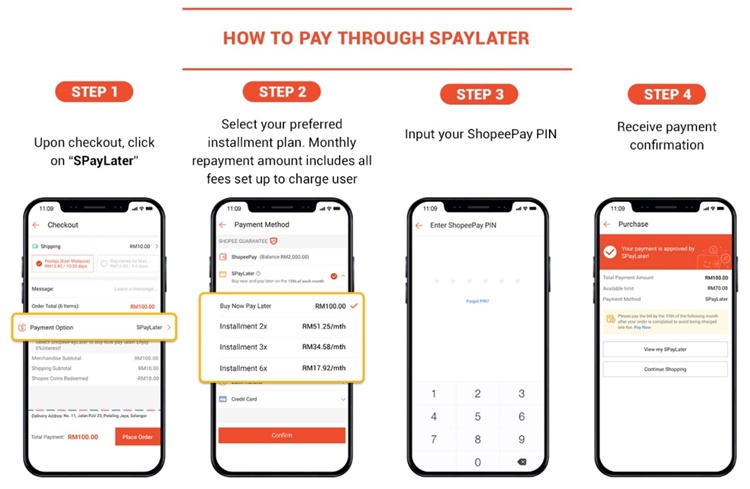
To activate SPayLater, users must meet standard requirements regarding age, identification documents, and personal verification. The submitted application is subsequently evaluated by partner banks to determine credit limits; meeting base criteria does not guarantee limit issuance.
Age Requirements and Valid Chip-Based ID Verification
Shopee pay later eligibility currently applies to Vietnamese citizens aged 18 to 55. Activation requires a valid chip-based Citizen Identity Card (ID/CCCD) for identity verification.
Before applying, confirm the following prerequisites:
- Aged between 18 and 55 years old.
- Possession of a valid Citizen Identity Card (CCCD).
- Clear, accurate, and legible document details.
- Utilization of your latest chip-based CCCD if the system prompts NFC verification.
If document information is inaccurate or fails to match submitted profile entries, the application may be rejected, requiring users to restart the identity verification flow.
Facial Recognition and NFC Authentication Steps
The SPayLater activation workflow requires identity authentication. Depending on system prompts, users may need to complete facial recognition, capture/read CCCD data, and perform biometric NFC scanning.
To prevent verification failures, update the Shopee/ShopeePay app to the latest version, keep your chip-based CCCD accessible, and enable NFC capabilities on your mobile device. During facial recognition, ensure your facial features match your registered ID profile photo accurately.
Maintaining Consistent Account Information
Beyond identification criteria, partner banks retain the right to conduct credit scoring and risk assessments before granting spending limits. Consequently, meeting the age requirement of 18 and possessing a valid ID does not guarantee SPayLater approval.
Users should maintain strict consistency across their Shopee account, ShopeePay Wallet, phone number, and registration details. If an application is declined, Shopee notes that partner banks do not provide specific rejection reasons; users can review submitted information and re-apply directly via in-app instructions.
(Note: Unofficial constraints—such as requiring 6 months of Shopee account activity, zero order returns, or mandatory 100% eKYC matching with personal bank accounts—are excluded as Shopee has not declared them mandatory prerequisites.)
Primary Reasons for SPayLater Limit Activation Rejections
When an SPayLater application is rejected, partner banks do not expose exact scoring criteria failures. Rather than assuming a specific cause, users should sequentially audit identification details, verification photo quality, and account status before re-applying.
Credit History Criteria Evaluation
SPayLater spending limits are evaluated and issued by partner banks based on individual credit profiles; applicants with credit histories that do not meet bank criteria may face rejection. Shopee does not publish explicit credit score thresholds for public benchmarking.
If you have past-due loan balances or credit accounts, audit your credit record prior to registration. Crucially, Shopee confirms that overdue SPayLater bills may be reported by partner financial institutions to the Vietnam Credit Information Center (CIC), impacting long-term credit scores.
(Specific banking entities like TPBank, VPBank, or Evocard should not be explicitly cited as the sole rejecting parties unless confirmed by official platform documentation.)
Obscured ID Information or Failed Facial/NFC Scanning
This represents an actionable rejection category that users can rectify independently. Shopee requires clear document imagery and precise text extraction; facial recognition scans must align seamlessly with ID credentials.
Before re-submitting your application:
- Use a valid, undamaged chip-based CCCD.
- Capture document photos under adequate lighting without glares, cropped corners, or motion blur.
- Verify that full names and personal identification numbers are entered correctly.
- Complete facial recognition without wearing glasses or hats in well-lit environments.
- When prompted for NFC, place your chip-based CCCD directly against the device’s NFC sensor area.
Shopee mandates NFC authentication for select user groups during activation; accounts failing to complete NFC verification may face SPayLater feature locks.
Application and Account Information Mismatches
System-level account policies dictate that each chip-based CCCD can only be linked to a single registered SPayLater profile across the Shopee ecosystem. Inconsistent profile details or mismatched identification data will result in application rejections.
If rejected, review feedback via the “Application Results” screen, correct erroneous data fields, and follow system prompts to re-submit. If issues persist, contact ShopeePay Customer Support directly rather than creating multiple alternative accounts.
Step-by-Step Guide to Activating SPayLater
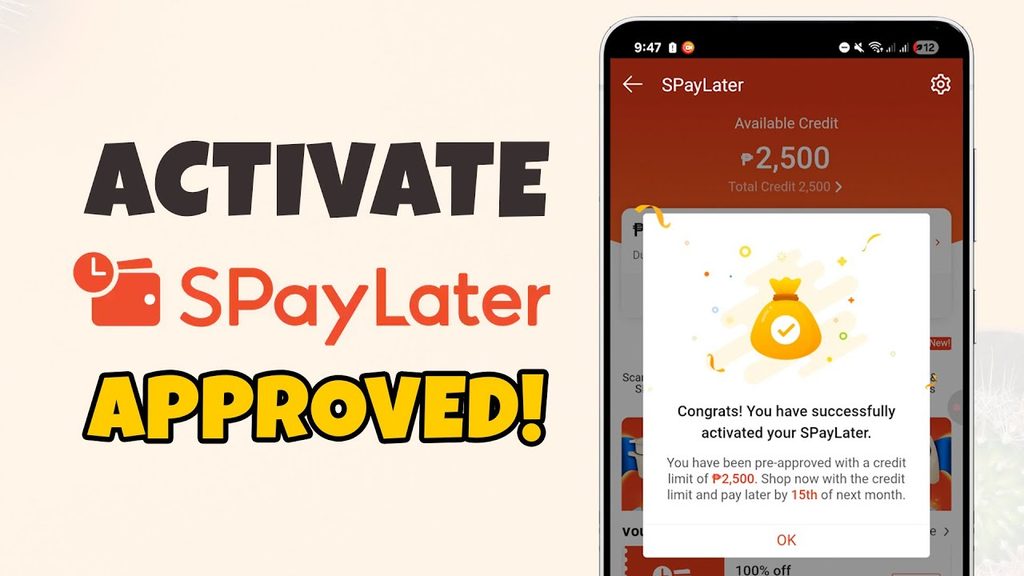
SPayLater activation is processed directly within the Shopee or ShopeePay application. Prerequisites require Vietnamese citizenship, age between 18–55, a valid chip-based CCCD, and an activated ShopeePay Wallet linked to the primary account.
Step 1: Access SPayLater and Initiate Activation
In the Shopee app, navigate to Me > SPayLater under My Utilities, then select Activate Now. Registration pages can also be accessed directly from checkout payment options or product detail pages.
If ShopeePay Wallet is not yet activated, the system will prompt wallet setup and identity verification before proceeding. For existing wallet users, ensure the Shopee account and ShopeePay Wallet are linked using the same registered phone number.
Step 2: Complete ID and Facial Biometric Scanning
Follow on-screen instructions to complete verification, which may involve capturing both sides of your CCCD, scanning QR codes, or performing NFC scans. Review auto-extracted text fields carefully and fill in missing personal data before confirming.
For NFC authentication, use your physical chip-based CCCD, remove thick phone cases, and hold the card steadily against your device’s NFC reader zone under clear lighting until scanning completes.
Step 3: Review Personal Data and Accept Terms
Once biometric scans are complete, audit your personal details thoroughly. Read the SPayLater Terms & Conditions alongside the Privacy Policy before submitting the application.
Double-check full names, CCCD numbers, and personal identifiers. Inaccurate data entries that conflict with biometric verification records will cause processing delays or application failures.
Step 4: Enter OTP for Partner Bank Review
Upon completing system checks, enter the OTP sent by the partner bank to your registered phone number. Entering the OTP serves as an electronic signature confirming your SPayLater service contract with the partner financial institution.
Applications are typically reviewed by partner banks within minutes following OTP entry. If processing exceeds 24 hours, Shopee recommends reaching out to ShopeePay Customer Support for manual assistance. Approved credit limits will render immediately on the SPayLater dashboard based on bank underwriting metrics.
Contact Info
Are you in need of Facebook advertising or need to rent a quality Facebook advertising account? Don’t worry! Rentads is a unit specializing in providing reputable Facebook accounts, as well as direct advertising support. Provides all types of advertising accounts such as google ads agency account for rent to help you reach and create fast conversions.
Frequently Asked Questions
No. SPayLater does not require salary slips, bank statements, or existing credit cards. Shopee’s risk engine evaluates eligibility based on account standing, platform transaction history, and profile verification metrics.
No. SPayLater incurs handling fees or interest charges only when active installment orders are placed. Inactive accounts with zero outstanding balances incur no recurring account maintenance fees.

