YouTube in feed video ad

In a context where users are increasingly accustomed to fast-paced content scrolling, the youtube in feed video ad has become a more natural approach compared to traditional interruptive formats. Instead of appearing as a break, the ad blends into the viewing flow, allowing users to receive information in a less resistant manner. This forces brands to shift their implementation mindset—from capturing immediate attention to building content relevant enough to make viewers stop. When designed correctly, a youtube in feed video ad not only enhances visibility but also lays the foundation for sustainable brand recall, even when the exposure duration is relatively short.
Layout of the YouTube In Feed Video Ad
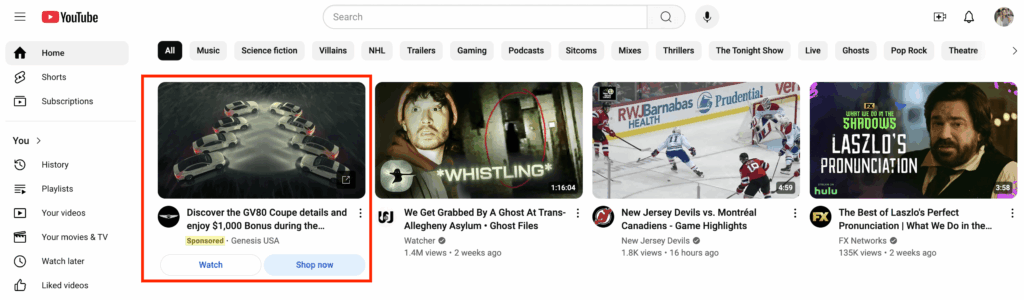
The youtube in feed video ad is one of YouTube’s most versatile ad formats, designed to appear where users are actively discovering content. Instead of causing disruption by interrupting a video, this format exists as a natural invitation for interaction, helping build trust and interest from customers. To optimize effectiveness, marketers need to master the structure of display components and understand user interaction behavior toward this ad type.
Structure and Display Format
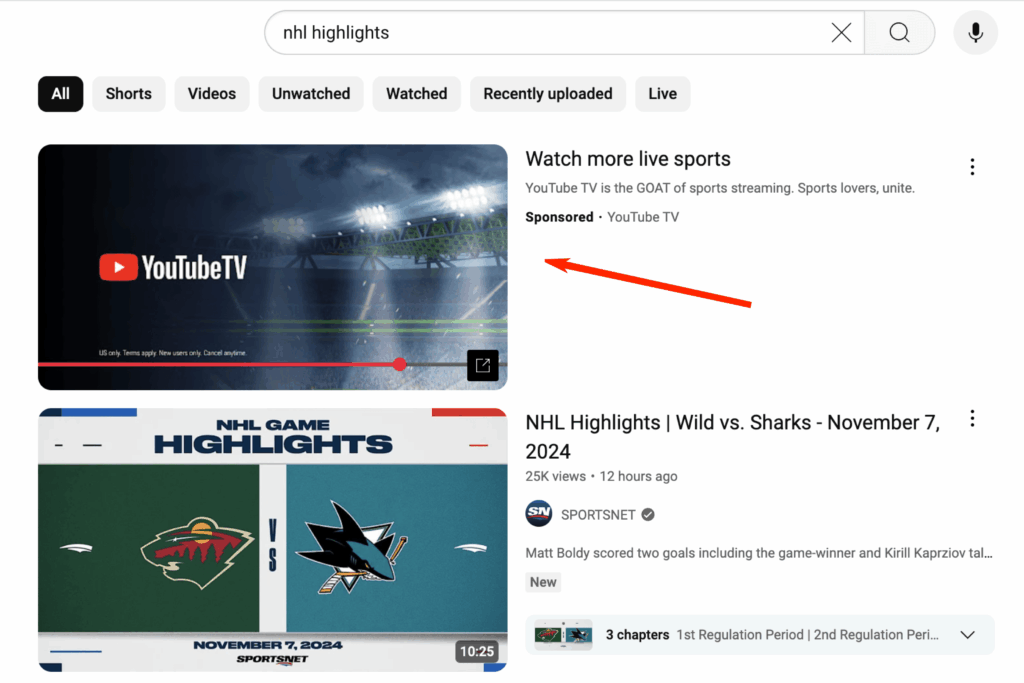
In terms of appearance, in-feed ads look similar to organic videos on the platform, minimizing the feeling of annoyance for viewers. A standard ad unit includes: an eye-catching thumbnail, a compelling headline, and up to two lines of descriptive text detailing the content or core value of the product. The only distinguishing feature is the “Ad” label attached to ensure transparency according to Google’s regulations. The mechanism of this format is based on initiative—users must click the thumbnail to start watching the video. This ensures that every view comes from voluntary intent, delivering higher conversion rates than passive display formats. The ad appears in strategic locations, including:
- YouTube Search Results: Appearing as soon as users enter relevant keywords.
- YouTube Home Feed: Appearing on desktop, mobile devices, and TV apps.
- Watch Next List: Located in the suggestions section when a user is watching a video with similar content.
Strategic Benefits
Using a youtube in feed video ad offers superior advantages in reaching target audiences at the right time. The first benefit is proactive reach, allowing brands to appear exactly when users are seeking information or entertainment—when their focus is at its peak. Additionally, this format plays a crucial role in enhancing awareness and driving consideration. By placing videos into the natural discovery journey, businesses can gently lead customers to learn more about a product without creating immediate buying pressure. Most importantly, this is a meaningful form of engagement, as advertisers only pay when customers are genuinely interested and click to watch, eliminating budget waste on impressions that bring no real value.
Cost Model and Impacting Factors
The youtube in feed video ad operates on a Cost Per View (CPV) model. This means your budget is only consumed when a user clicks the thumbnail to watch the ad. This is a smart bidding mechanism that optimizes financial efficiency for the business. In actual distribution, CPV rates are not fixed but fluctuate based on market factors:
- Campaign Budget and Goals: The final cost depends on your maximum bid and the Google algorithm’s optimization capability for your chosen audience.
- Industry Competition: In niche markets or premium sectors, CPV can range from $0.05 to $0.20 per view. In mass consumer goods sectors, this cost can be lower, from $0.01 to $0.03.
- Content Quality and Targeting: If the thumbnail and headline have a high Click-Through Rate (CTR), YouTube’s system will evaluate the ad as useful and may prioritize display at a more competitive bid.
How to Post a YouTube In-Feed Video Ad
To realize the goal of reaching customers through the in-feed video format, advertisers need to follow a methodical setup process via the Google Ads management system. This process is not merely about uploading content; it requires careful calculation of campaign goals, audience segments, and bidding strategies.
Step 1: Prepare and Upload the Video Ad to YouTube
The most important starting point is getting your video content onto the YouTube platform. Once post-production is complete, upload the video to your business’s official YouTube channel. During upload, you can set the video to “Public” or “Unlisted.” Unlisted mode is often preferred if the video is intended solely for campaign purposes and you do not want it to appear in the organic video list on your channel. Regardless of the mode, the video must strictly comply with YouTube’s community standards to avoid rejection.
Step 2: Campaign Configuration
Once you have the video asset, access Google Ads manager to begin technical configuration.
- Define Goals: Choose an appropriate goal, typically “Brand and Product Consideration” or “Drive video views and website traffic.”
- Select Campaign Type and Format: Choose the Video campaign type and specifically select the “youtube in feed video ad” format.
- Set Budget and Bidding Strategy: Apply the CPV bidding strategy. For example, you can set a target bid of $0.02 to $0.05 per view depending on market competition.
- Targeting: Filter your potential customer group based on demographics (age, gender, location), interests, and the video topics they frequently watch.
Step 3: Select the Video and Officially Publish
The final step is connecting the YouTube video to the Google Ads unit. Paste the URL of the video prepared in Step 1 into the ad content frame. Complete the display elements: choose the most attractive thumbnail, write a concise headline under 100 characters, and two succinct description lines to encourage clicks. Once ready, hit “Publish.” The campaign will enter a review state; Google typically takes a few hours to 24 hours to approve the content before it officially begins distributing across the YouTube feed.
Contact Info
We provide services google account for rent nationwide, and with a team of experienced and qualified staff who both support advertising and can directly perform Facebook advertising if you need. Contact us via phone number.
Frequently Asked Questions
In-feed ads require an active click to watch rather than auto-playing. An average CTR for this format ranges from 0.2% to 1.2%. If your metric is below 0.2%, the cause is usually a non-compelling thumbnail or a headline that hasn’t hit the audience’s pain point.
Currently, Google Ads does not allow advertisers to completely separate these placements within the same in-feed campaign. The ad is distributed intelligently where the algorithm deems it most likely to generate views at an optimal cost. You can only control this indirectly by selecting specific keywords to prioritize appearing on the search results page.

