Youtube trueview ad specs
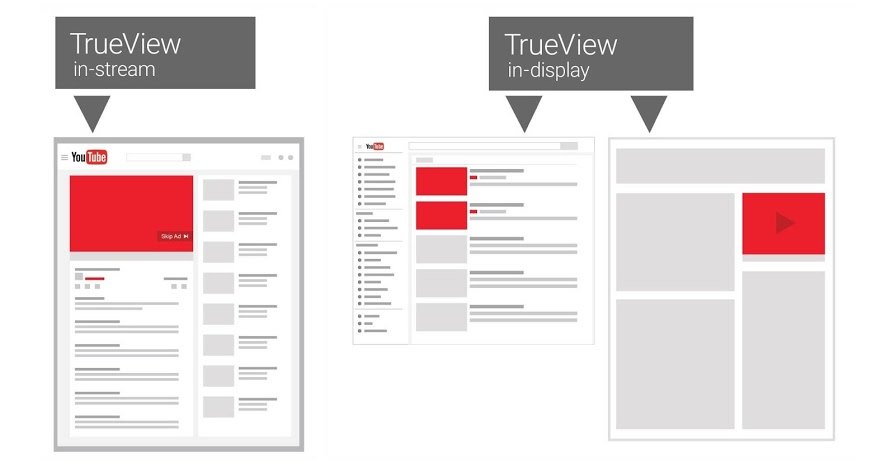
TrueView is a format that allows brands to proactively control costs and reach through actual user viewing behavior. However, to ensure a campaign operates stably without discrepancies during distribution, mastering youtube trueview ad specs is mandatory—not only during the setup phase but throughout the campaign lifecycle. From video duration, aspect ratio, and file formats to valid display conditions, every parameter directly affects qualified views and budget optimization. If these technical details are overlooked, the ad may still run, but measurement efficiency will be inaccurate. Join RentAds in exploring youtube trueview ad specs to ensure your video both meets technical requirements and supports your established communication goals.
Technical Factors Determining TrueView Video Display Effectiveness
For TrueView videos to be distributed stably and reach the right audience, creative elements alone are not enough. YouTube’s system always prioritizes videos that fully meet technical requirements, as this is the foundation for the algorithm to evaluate display quality, playback smoothness, and overall viewing experience. Even within the same campaign, a slight discrepancy in technical parameters can cause significant differences in display effectiveness and actual costs.
Preferred Aspect Ratios
YouTube prioritizes videos that use common standards that are easy to process and highly compatible across multiple devices. The MP4 format with the H.264 codec is the safest choice because it ensures fast loading speeds, stable imagery, and fewer playback errors. Regarding aspect ratios, 16:9 remains the primary standard for TrueView, especially on desktops and connected TVs. However, given that mobile users account for a large proportion of traffic, 1:1 or 9:16 ratios are also acceptable if the content is appropriately designed. The key lies in ensuring the video is not incorrectly cropped when displayed on different screens. If the frame is not optimized, the viewing experience declines, leading to higher early-skip rates and reduced priority in the distribution algorithm.
Requirements for Audio, Resolution, and File Size
Audio is an element often overlooked but directly affects the ability to retain viewers after the first few seconds. YouTube prioritizes videos with clear audio, free from distortion or excessive background noise. Common audio standards are AAC or MP3 with a stable bitrate, ensuring dialogue and background music do not clash unpleasantly. For resolution, the recommended minimum is Full HD 1080p. While lower-resolution videos can still run, they are often rated poorly for display quality, especially on large screens. File size must also be reasonably controlled; excessively heavy videos take too long to load, while overly compressed videos suffer from pixelation. Balancing quality and size helps the video play smoothly, thereby improving the qualified view rate.
Conditions for a Valid Video
Not every video uploaded to YouTube is eligible for TrueView. The video must be set to Public or Unlisted, allow embedding, and comply with Google’s advertising policies. Content containing sensitive elements, unclear copyrights, or unlicensed music risks restricted distribution. Additionally, the video must be uploaded to the channel before being linked to Google Ads. During the review process, the system checks both content and technical specs simultaneously. If the video meets all conditions, the ad will be distributed stably. Conversely, if even one element is sub-standard, the campaign may still run, but distribution will be slow, views will be inconsistent, and costs will be difficult to control.
YouTube TrueView Ad Specs During Campaign Setup
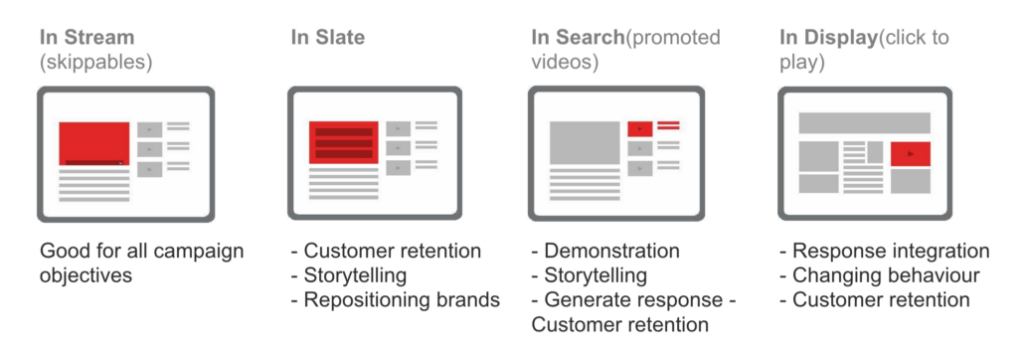
When implementing TrueView, the campaign setup phase is not just about choosing objectives or budgets; it is the stage that determines whether the ad is distributed correctly by the system. Technical parameters related to views, interactions, and video upload conditions directly affect whether an ad is recorded as valid, cost-optimized, and performance-stable. Overlooking or misunderstanding these youtube trueview ad specs at this stage can result in inaccurate measurement data and biased evaluations of actual effectiveness.
Duration and View Counting Thresholds
With TrueView ads, Google does not charge for every impression but only records a view when the viewer reaches a certain threshold. Specifically, a qualified view is counted when a user watches at least 30 seconds of the video, or the entire video if it is shorter than 30 seconds. Furthermore, if a viewer performs an early interaction such as clicking a CTA or an accompanying banner, the view is still considered valid even if it hasn’t reached the 30-second mark. This regulation makes video duration a strategic factor. A video that is too short might end before the message is fully conveyed, while a video that is too long but not engaging in the early stages will see a sharp decline in the qualified view rate. Therefore, many effective TrueView campaigns maintain a length from 15 seconds to about 2 minutes—long enough to convey info but short enough to hold attention through the first 30 seconds.
How the System Records Views and Interactions
YouTube’s system doesn’t just track whether a video is played; it analyzes user behavior throughout the ad display. Views are recorded based on continuous watch time, audio status, viewer proactivity, and interactive actions occurring during playback. Interactions such as clicking the Call-to-Action button, visiting the website, watching more videos on the channel, or subscribing are viewed as positive signals by the system. These signals not only serve reporting but also influence future distribution. Ads with good interaction rates are prioritized for more impressions as the system deems the content highly relevant to viewers. Conversely, if users consistently skip as soon as possible or mute throughout the duration, the system will gradually decrease distribution priority, even if budget remains.
Technical Limits to Note When Uploading
Before setting up the ad, TrueView videos must be uploaded to YouTube and meet all the platform’s technical requirements. The video must be Public or Unlisted, allow embedding, and adhere to Google’s content policies. Private videos are not eligible for advertising. Technically, YouTube recommends using common formats like MP4 with the H.264 codec and a minimum resolution of 720p to ensure quality across devices. The 16:9 aspect ratio is the most common standard, though square or vertical ratios are acceptable for mobile-focused campaigns. Audio must be clear and not distorted, as audio status is a factor in view recording. Additionally, titles and descriptions must comply with character limits to avoid being misleading or restricted.
Contact Info
Information about “Youtube trueview ad specs” hopes to provide you with additional necessary knowledge. At Rentads, there is a team of highly qualified and experienced staff and experts who will provide google ads account for rent as well as support when you run Facebook ads. Contact us via phone number.
Frequently Asked Questions
In TrueView ads, many system graphic elements overlay your video: the “Skip” button in the bottom-right, the countdown timer, the CTA button, and the companion banner. If you place a logo or vital info in the bottom 20% or the right-side margin, they will be obscured. The safety rule is to keep all core messages and character faces in the Center 80% of the frame.
Extremely important but often neglected. This is the 300×60 image that appears next to the ad on desktop versions. If you don’t upload a custom one, YouTube will auto-generate it from your channel’s video list, which looks unprofessional. A standard companion banner maintains brand presence even after a viewer skips or the ad ends, significantly increasing the overall Click-Through Rate (CTR).

