Youtube trueview video specs
When implementing video ads on YouTube, the creative part is only half the story; the other half lies in the technical configuration behind the scenes. Youtube trueview video specs directly determine whether a video is distributed stably, displayed correctly, and recorded with accurate views. If requirements for duration, aspect ratio, file size, or display mode are overlooked, the campaign can easily face poor distribution or data discrepancies. That is why, before diving deep into content optimization, brands need to master the technical foundation from the start. In this article, let’s join RentAds in exploring a more systematic and practical perspective on youtube trueview video specs, helping the campaign setup process become streamlined, well-controlled, and free from unnecessary risks.
YouTube TrueView Video Specs During Campaign Setup
When implementing TrueView ads, the creative must not only meet content requirements but also strictly comply with the youtube trueview video specs set by YouTube. These factors directly affect the system’s acceptance for distribution, compatibility across devices, and actual display effectiveness.
Standard Aspect Ratios for Each Device
TrueView allows distribution across various viewing contexts such as mobile devices, computers, and smart TVs; therefore, the video’s aspect ratio plays a vital role. The 16:9 ratio remains the most common standard, suitable for landscape viewing on desktops and TVs, while ensuring stable display in pre-roll, mid-roll, or post-roll positions. Additionally, 1:1 and 9:16 ratios are increasingly used to adapt to vertical viewing behavior on mobile devices, especially within the YouTube app environment.
Choosing an aspect ratio is not just an aesthetic matter but also affects how YouTube crops, aligns, and allocates display space. An incorrect ratio can result in black bars, a shrunken image, or a loss of visual impact, reducing the ability to retain viewers in the first few seconds. In practice, many brands produce multiple versions of a video with different ratios to allow the system to automatically distribute the most suitable version based on the viewer’s device.
Minimum Resolution Requirements
YouTube sets clear technical thresholds for resolution to ensure the quality of the user experience. For TrueView ads, the recommended minimum resolution is typically 720p (1280 × 720) or higher. Lower-resolution videos can still be uploaded, but their ability to be distributed widely and stably will be limited, especially on large-screen devices.
High resolution not only provides sharp imagery but also assists the algorithm in evaluating the overall quality of the video. When launching large-scale campaigns, videos reaching Full HD (1920 × 1080) offer a clear advantage in consistent display across various viewing positions. However, higher resolution means larger file sizes, so it is necessary to balance quality with loading speed and system processing capability to avoid video buffering on weak connections.
Codec and File Format Requirements
Besides visuals, YouTube strictly regulates codecs and file formats to ensure stable processing, compression, and playback. Common formats like MP4, MOV, and AVI are prioritized, with MP4 using the H.264 codec for video and AAC for audio considered the safest choice for TrueView ads. This format offers high compatibility, optimized size, and fewer errors during upload.
Audio needs to be encoded at a stable quality, avoiding distortion or volume discrepancies between segments. Furthermore, videos should not contain rare codecs or overly specific compression formats, as the system may take longer to process or even refuse distribution. Standardizing codecs and formats from the start helps minimize technical risks and facilitates a smoother review and distribution process.
Technical Limits to Follow When Using TrueView
Creative elements are only one part of the story. The rest—and the deciding factor in whether the ad is distributed stably—lies in the technical limits set by YouTube and Google Ads. These limits are not merely formal; they directly impact how views are recorded, auction participation, and display priority.
Duration Thresholds Affecting View Counting
TrueView allows for flexible duration; however, the system does not record every play as a valid view. For skippable ads, a view is only counted when a viewer actively watches for at least 30 seconds or watches to the end if the video is shorter than 30 seconds. This makes duration a technical factor directly affecting costs and performance metrics.
A video that is too short may easily reach the qualified view threshold but limit the ability to convey a message. Conversely, a long video that fails to hold attention from the start will see a sharp increase in skip rates, leading to low valid views despite high impressions. Therefore, duration thresholds must be determined alongside measurement goals and the TrueView view-counting mechanism.
Audio and Visual Regulations
Google applies strict standards for audio and visuals to ensure user experience. TrueView videos must have clear image quality, free from blur, shaking, pixelation, or distracting elements like heavy flickering or prolonged glare. Audio must be loud and clear, without cracking, unusual silences, or startling noises at the beginning.
Simultaneously, content policies are checked. Videos with shocking imagery, sudden loud noises, or misleading effects risk restricted distribution or rejection. In many cases, the ad is approved but faces a reduced ability to participate in auctions, leading to slow distribution and higher costs.
Video Status Affecting Distribution
A frequently overlooked technical factor is the video’s status on YouTube. Videos used for TrueView must be in Public or Unlisted mode; Private videos are ineligible. Additionally, the video must allow embedding, as TrueView operates by displaying videos in various locations across the YouTube ecosystem.
Copyright status also plays a major role. Videos containing unverified copyrighted music or imagery may be flagged, interrupting distribution. Monitoring video status throughout the campaign lifecycle is essential, as any change can lead to an immediate halt in distribution without prior notice.
How the System Records TrueView Views
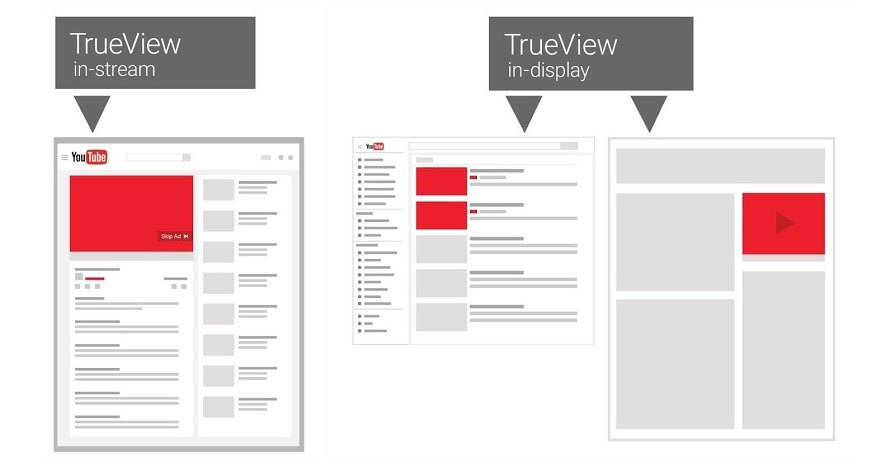
With TrueView, an ad being displayed does not mean a view has been recorded. Google utilizes a strict measurement mechanism to reflect the viewer’s active engagement, helping advertisers control costs and evaluate distribution quality.
Conditions for Valid View Recording
A TrueView view is only recorded when the user demonstrates voluntary viewing behavior. For skippable video ads, the system counts a view when the user watches for at least 30 seconds (or the full duration if shorter). If a user interacts early—such as clicking a link, CTA button, or companion banner—a view is recorded even if the watch time is under 30 seconds.
The Difference Between Impressions and Views
An impression is recorded as soon as the ad appears on the user’s screen, regardless of whether they continue watching. This metric reflects the scale of distribution. However, impressions do not reflect content engagement quality.
In contrast, a view is only recorded when time or interaction conditions are met. Thus, views carry deeper meaning, showing that the message had the opportunity to be fully delivered or at least long enough to create an initial impression. The discrepancy between impressions and views is often used to evaluate the attractiveness of the video’s opening.
Impact of Skipping Behavior on Cost
Skipping behavior plays a direct role in controlling TrueView costs. When a viewer skips before reaching the view-counting threshold and does not interact, the system does not charge. This ensures the budget is only used for valuable views where users actually spend time or respond.
However, a high skip rate is not always a positive sign of low costs. If most viewers skip within the first few seconds, the quality signal of the ad declines. In the long run, this can affect stable distribution and the system’s priority for that ad. Balancing content structure, pacing, and the opening message is crucial to maintaining the right equilibrium between budget efficiency and view quality.
Contact Info
Information about “Youtube trueview video specs” hopes to provide you with additional necessary knowledge. At Rentads, there is a team of highly qualified and experienced staff and experts who will provide google ads account for rent as well as support when you run Facebook ads. Contact us via phone number.
Frequently Asked Questions
While YouTube supports up to 128GB, using excessively heavy files in advertising is a major technical mistake. TrueView ads need to load instantly to “interrupt” the main content. If the file is too large, buffering occurs during the first few seconds—the most critical time to retain viewers. Ideally, optimize files so they do not exceed 50-100MB for a 15-30 second video.
In 2026, YouTube’s algorithm uses AI to analyze audio to ensure users aren’t bothered by volume extremes. Standard youtube trueview video specs for audio are AAC-LC at 128kbps+ with an average loudness of approximately -14 LUFS. If your audio is distorted or exceeds loudness limits, the system may restrict distribution or lower the ad’s quality score due to a “poor experience” rating.

