Bank transfer in shopee
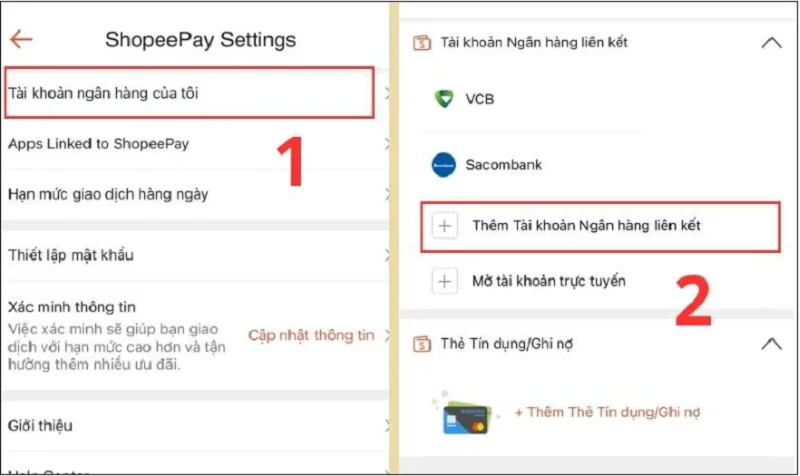
The habit of paying for orders via mobile banking applications has become the preferred choice for numerous shoppers due to its familiarity and the absence of any requirement to open intermediate e-wallets. Using a bank transfer in shopee connects the e-commerce platform directly with the local VietQR banking network, allowing orders to clear automatically after scanning a code. The flexibility of a bank transfer in shopee is evident in its instant transaction confirmation speed, maximizing buyer peace of mind by eliminating the need to store personal card details on the application. RentAds provides a detailed guide on generating payment QR codes, essential notes regarding transfer remarks, and troubleshooting steps for instances where bank accounts are debited but order statuses remain unupdated.
How Does Dynamic VietQR Work in Bank Transfer in Shopee?

When selecting a bank transfer in shopee using VietQR, the system generates a dynamic QR code containing payment details specific to the order. Buyers simply open a banking application that supports VietQR, scan the code, and review the transaction information prior to confirming payment. This approach minimizes manual entry errors regarding account numbers and purchase totals while accelerating transaction completion.
What Information Does a Dynamic VietQR Code Contain?
For QR codes generated for specific purchases, embedded payment details typically include recipient account information, exact order amounts, and identification remarks used to recognize transactions. The unique remark sequence enables automated systems to match incoming funds with corresponding orders.
Consequently, prior to tapping confirm within banking apps, buyers must verify recipient names, transfer amounts, and payment remarks. Refrain from manually modifying generated amounts or remark codes to ensure accurate automated transaction reconciliation.
How Does Shopee Reconcile Payments Following Bank Transfers?
Once banking institutions process transactions successfully, payment details are cross-checked against order data. When incoming funds are validated, order payment statuses update on Shopee and fulfillments proceed under standard operating procedures.
Processing timelines may vary across individual transactions. If bank accounts show debited funds but order statuses remain unupdated, refrain from transferring funds a second time. Inspect transaction histories, save transaction reference codes, and allow the system processing time or contact customer support if statuses remain unchanged.
What Advantages Does VietQR Offer Over Entering Card Information?
Using VietQR within a bank transfer in shopee eliminates requirements to input Visa, Mastercard, or credit card numbers during checkout. Users process transactions directly from bank accounts through supported banking apps, offering a practical solution for shoppers who prefer not to store personal card details on e-commerce platforms.
Another advantage is that VietQR operates independently of specific card-issuing institutions. Buyers can utilize accounts from any bank supporting VietQR to process transactions. However, actual payment availability depends on payment options rendered by Shopee for specific orders and the user’s banking provider.
Three Golden Rules for Automated VietQR Payment Recognition
Paying via VietQR streamlines data entry, but transactions must still be reconciled accurately against generated orders. Any discrepancy in transfer remarks, payment amounts, or executing transfers after code expiration can prevent automatic payment recognition. Following these three rules helps avoid common checkout errors.
Rule 1: Retain System-Generated Transfer Remarks Exactly as Provided
When scanning QR codes, banking apps automatically populate recipient details, payment amounts, and transfer remarks. If these remarks contain specialized character strings used for order identification, refrain from adding names, phone numbers, or personal notes.
Before confirming, verify recipient names and transfer remarks against figures displayed on Shopee. If banking apps fail to auto-populate information correctly or if remarks were edited accidentally, return to the checkout step to verify details rather than proceeding with mismatched data.
Rule 2: Transfer the Exact Amount Required by the System
Do not round figures or adjust payment amounts when making QR payments. When Shopee generates a specific payment figure, transfer the exact value displayed to supply sufficient data for automated system reconciliation.
For instance, if a payment code displays 1,250,500 VND, do not transfer 1,250,000 VND under the assumption that minor discrepancies do not matter. In cases of incorrect transfer amounts, payments may require manual inspection and processing rather than updating automatically.
Rule 3: Complete Transactions While QR Codes Remain Valid
If payment interfaces display QR code countdown timers, complete scanning and transfer operations before expiration. Expired codes may no longer link to original transactions, requiring buyers to generate new payment details.
If funds have been sent but QR codes expire or order statuses remain unupdated, do not scan new codes or submit duplicate payments immediately. Review bank transaction records and order statuses first, saving transaction reference IDs for reconciliation if funds remain unrecorded.
What to Do When Bank Transfers Succeed But Orders Remain Unupdated
Scenarios where bank accounts report successful transfers while Shopee orders remain in unpaid statuses can occur during system reconciliation windows. During such moments, the most critical step is refraining from sending additional money immediately. Systematically inspect bank transactions and order details to confirm whether funds were transferred correctly.
Check Bank Transaction Histories Before Attempting Re-Payment
Open your banking application and confirm whether recent transactions show successful or pending processing statuses. Cross-check transfer timestamps, payment amounts, and beneficiary accounts against order specifications.
If transactions report success and funds have been debited, avoid making second transfers simply because Shopee has not updated order statuses yet. Transferring money again can lead to duplicate payments for a single order, requiring subsequent refund processing.
Cross-Check Payment Amounts, Recipients, and Remarks Against Orders
If bank transactions succeed, review three core details: transferred amounts, recipient account details, and transfer remarks. These data points determine whether funds correspond to transactions generated on Shopee.
Particularly, if QR codes auto-filled transfer remarks but buyers edited them prior to confirmation, transactions may require additional manual verification rather than updating automatically. If transferred amounts do not match system requirements exactly, save transaction details for inspection instead of manually transferring remaining differences.
Save Transaction Reference Codes and Contact Support
If bank transactions succeed but orders remain unupdated after verifying information, retain transaction reference IDs, transfer timestamps, payment amounts, and status screenshots. These records serve as essential evidence when requesting Shopee to investigate unrecorded payments.
When reaching out to customer support, provide accurate order IDs and transaction details rather than initiating new transfers. While awaiting resolution, preserve transaction evidence and refrain from canceling orders or re-attempting payments until initial fund statuses are clarified.
Contact Info
You need a Facebook advertising account but don’t know any reputable provider. Coming to Rentads is where you will experience what you need google ads agency account for rent prestige, high trust, and professional consulting and service support for customers.
Frequently Asked Questions
No. Shopee charges no extra fees for this payment method, and most banks currently provide free money transfers via QR code scanning.
Yes, provided the QR code remains within its active validity countdown timer on the app. If the code has expired, exit the screen and re-select the payment method to generate a new QR code.

