Barcode merchant shopee
When scaling a storefront from a few daily orders to hundreds per day, relying on manual visual selection during picking frequently leads to shipping wrong colors, incorrect sizes, or missing items. Implementing a barcode merchant shopee system serves as an operational control tool, enabling automated scanner reading and precise real-time inventory deductions at every fulfillment stage. Utilizing a barcode merchant shopee workflow not only shortens order preparation times but also minimizes Return/Refund dispute rates caused by packing errors. RentAds provides a detailed analysis comparing product SKU item labels against logistics air waybills, alongside setting up a “3-second” picking flow for sellers.
Distinguishing the Two Types of Barcode Merchant Shopee Labels
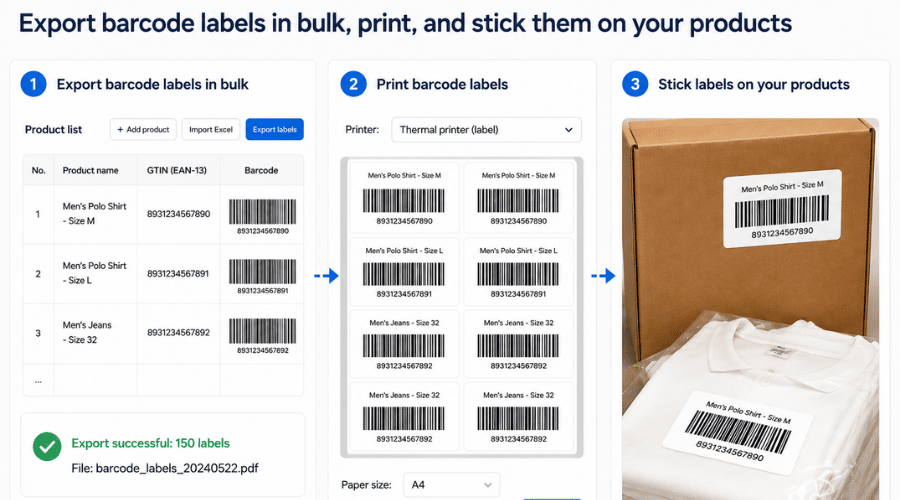
During order processing, sellers frequently interact with multiple identification codes. The two primary types utilized to identify products and shipments are internal SKU codes and logistics air waybills. Understanding the exact function of each helps eliminate product picking errors and mislabeled shipping receipts within a barcode merchant shopee workflow.
Internal SKU Codes Identify Individual Products
An SKU (Stock Keeping Unit) is a code established by the seller to manage and distinguish distinct products or variants in the warehouse. For example, a single t-shirt model available in black, white, and three different sizes can be assigned individual SKU codes so warehouse staff can quickly identify the exact item required.
An SKU does not necessarily refer to pre-printed manufacturer barcodes. When a store utilizes an internal barcode merchant shopee labeling setup for inventory management, these codes can be printed or applied directly onto packaging and linked to corresponding SKUs. Upon scanning, staff can rapidly confirm the specific item, color, size, or variant against inventory management data.
Air Waybill Codes Identify Packages
An Air Waybill (AWB) code is generated by logistics providers or delivery systems for a specific parcel. Shipping receipts typically feature an AWB in barcode or scannable format, enabling courier personnel to scan and track parcel journeys.
Information on shipping receipts can include recipient names, delivery addresses, contact details, and essential shipping data. AWB codes primarily serve package identification during handovers and transit, and they cannot replace SKU codes for identifying internal parcel contents.
Combining SKUs and Air Waybills to Reduce Order Errors
These two codes serve different stages within order processing workflows. Warehouse staff rely on SKUs to identify the correct item, variant, and quantity from storage shelves; they then verify orders prior to packing and affix the receipt containing the matching AWB code onto the parcel.
A streamlined workflow follows this sequence: scan or cross-check SKUs to retrieve correct items → verify items against order details → pack items → apply matching AWB shipping labels → scan AWB barcodes during handover to logistics providers.
When a store utilizes a barcode merchant shopee inventory system or handheld scanners, combining both codes significantly reduces variant picking mistakes and mislabeled parcels, particularly when processing high daily order volumes with similar items.
Guidelines for Naming SKU Codes for Rapid Scanner Recognition
An effective SKU code does not need to be excessively long; it needs to be consistent and readable. When integrated with barcode labels and inventory management systems, a well-structured code allows staff to identify items, variants, and shelf locations without manual lookups.
Creating Concise, Unaccented SKUs Without Special Characters
Construct SKUs using unaccented letters, numbers, and simple separators like hyphens if supported by your software. For example, a product named “Women’s Black T-Shirt Size M” can be coded as ATN-DEN-M rather than a long string containing accented text.
This naming convention keeps labels readable when printed, entered into spreadsheets, or synchronized across systems. However, avoiding accented text is not mandatory due to potential printer font errors; character rendering depends on label creation software, fonts, and printer hardware. Using unaccented characters primarily reduces data entry, search, and sync errors.
Establishing a consistent code structure from the start is paramount. For instance, adopt a standard PRODNAME-COLOR-SIZE convention and apply it uniformly across all warehouse inventory rather than using varied formats for different product groups.
Incorporating Shelf Locations Into SKUs to Shorten Retrieval Times
For warehouses containing multiple racks, shelves, and bins, adding location codes into inventory data helps staff locate items faster. A structure like A03-T02-O05 can correspond to Rack A03 – Shelf 02 – Bin 05.
However, separate product codes from warehouse locations if products shift shelves frequently. For instance, keep the SKU ATN-DEN-M unchanged even if items move from Rack A03 to B01, managing storage locations in a dedicated data field. This prevents the need to alter SKU codes and reprint all physical labels during warehouse reorganizations.
If both elements must be combined into a single internal scannable code, a structure like A03-T02-O05-ATN-DEN-M can be used, provided clear conventions prevent staff from confusing location codes with product specifications.
Standardizing Data Files Before Bulk Printing Barcode Labels
When managing large SKU counts, standardize product lists in Excel before generating barcode labels. Each row should correspond to one SKU and include fields such as product name, SKU, color, size, shelf location, and required print quantities. Warehouse management software or batch barcode creation tools can then ingest the data to generate labels.
Sellers should not assume that the Shopee Seller Centre supports direct Excel uploads containing raw barcode strings to generate physical labels automatically. Import and export capabilities depend on active Shopee features and third-party inventory software utilized by the store. If Shopee lacks this direct capability, the Excel file serves as source data for external label printing software, followed by updating matching SKUs on the seller portal.
Prior to bulk printing, execute test runs on a small batch to evaluate scanner readability. Barcodes must print clearly without smudging or improper scaling; after scanning, verify displayed results against system SKUs. Completing this test prevents re-printing full label runs if code structures or printer settings require adjustment.
High-Speed Packing Steps Using Barcode Scanners
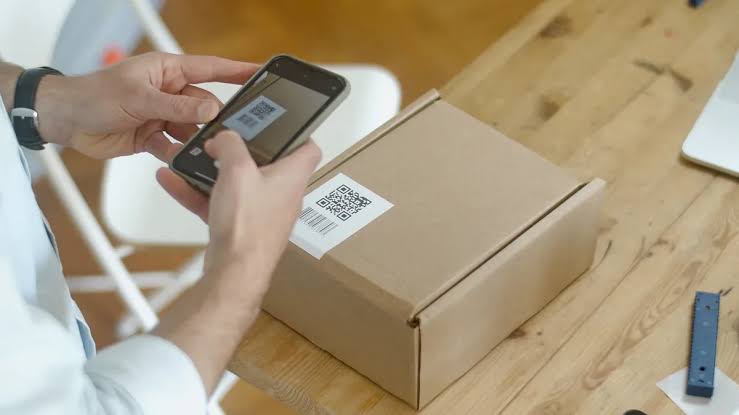
During peak order spikes, staff can combine pick lists with barcode scanners to shorten search, verification, and packing steps. Scanning each item prior to sealing parcels provides a more reliable verification process than visual inspection alone.
Item Picking Step
Before retrieving stock, print consolidated pick lists or batch retrieval sheets. Lists should display order IDs, SKUs, product names, variants, quantities, and matching barcodes so staff can scan or cross-check items while navigating warehouse aisles.
When processing multiple orders containing identical items, pick by SKU rather than handling orders individually. For example, if a batch contains 10 orders for black M-size shirts, staff move to the designated bin once, retrieve the full quantity, and verify against the pick list. This approach reduces unnecessary movement between shelves and minimizes missing items.
Verification Step
After picking items, scan product or SKU barcode labels to verify contents before packing. The scanner transmits read data to management software; if the code matches the item required for the order, the system outputs a confirmation signal according to software settings.
Only place items into shipping boxes and proceed to sealing after receiving a correct code confirmation. If the scanner signals an error, fails to recognize the code, or detects an item mismatch, halt processing to inspect the SKU, color, size, and quantity rather than bypassing warnings. For multi-item orders, scan items sequentially to minimize missing or incorrect products.
Packing Step
When utilizing thermal printers to print SKU or barcode merchant shopee labels, select label dimensions based on required information density and printer capabilities. A 50 × 30 mm label suits small barcode stickers containing only SKUs and scannable lines, whereas an A6 format provides larger surface area for detailed information.
Label material durability is more critical than sizing. Standard direct thermal paper can degrade when exposed to water, humidity, or friction; if goods encounter moist environments, consider heavy-duty thermal decals or water-resistant materials. After applying labels, ensure surfaces remain flat and barcodes remain unwrinkled and unobstructed for seamless scanning in downstream operations.
Contact Info
Are you in need of Facebook advertising or need to rent a quality Facebook advertising account? Don’t worry! Rentads is a unit specializing in providing reputable Facebook accounts, as well as direct advertising support. Provides all types of advertising accounts such as google ads account for rent to help you reach and create fast conversions.
Frequently Asked Questions
No. Product SKU barcodes are internal tools used for warehouse management. However, logistics barcodes on Air Waybills (shipping receipts) are mandatory on every package.
You should use a dedicated direct thermal printer (inkless) paired with thermal decal paper. This setup yields dark, clear prints that scan quickly and resist smudging when affixed to parcels.

