Top up paypal shopee
Having funds available in a PayPal account while Shopee declines direct payment causes frustration for many users. This technical barrier stems from foreign exchange regulations and payment gateway integration constraints between financial institutions. The goal to top up ShopeePay from PayPal can only be resolved by using a local bank account as an intermediary bridge. Executing the process to top up ShopeePay from PayPal through the correct workflow ensures funds arrive safely, minimizing risks of high exchange fees or falling for scams from unverified online money exchange services. The RentAds team provides an in-depth analysis of withdrawal costs, processing timelines, and temporary alternative payment channels.
Warning Against Scam Traps From Instant top up paypal shopee From PayPal Services
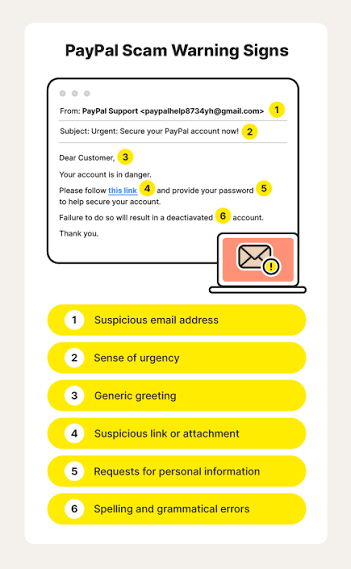
It should not be assumed that services offering to receive PayPal funds and instantly top up ShopeePay on social media groups are official deposit channels. ShopeePay publishes its deposit methods on its own system, while PayPal also clearly regulates the rules for depositing, withdrawing, and transferring funds between eligible accounts or payment methods. Therefore, advertisements promising to convert PayPal to ShopeePay in 5 minutes, clear debts on your behalf, or demanding advance money transfers to personal accounts should be carefully checked before transacting.
Virtual Debt Clearance Schemes and Promises of Instant Money Transfer
A notable tactic involves sellers requiring buyers to transfer PayPal funds first, followed by a commitment to convert the money to Vietnamese Dong or add the balance to ShopeePay within minutes. After receiving the funds, perpetrators may send fake transaction screenshots, declare that debt clearance is complete, or demand additional fees to finalize, while the actual wallet balance remains unchanged.
Users should never provide passwords, OTP codes, PINs, or account access rights for PayPal or ShopeePay to third parties for verification. If you need to verify a transaction, log in directly to the official application or website and cross-check your transaction history rather than relying solely on screenshots provided by sellers.
Caution Required for Irregular Transactions
PayPal notes that transactions evaluated as high risk may be subjected to closer review or suspended for examination before being allowed to proceed. The user agreement also permits PayPal to place holds on, cancel, or reverse certain transactions upon detecting policy violations.
This does not imply that using external money exchange services will automatically result in a permanent account ban. However, transacting through unverified third parties makes it difficult for users to prove fund origins, complicates dispute handling, and increases the risk of losing account control. When encountering issues with ShopeePay, inspect your transaction history directly and contact official support channels instead of continuing to transfer money to intermediaries. ShopeePay currently lists its support hotline as 1900 6906 on its official website.
Beware of Exchange Rates and Hidden Fees
The actual cost of converting PayPal to Vietnamese Dong extends beyond the discount rate advertised by intermediaries. PayPal states that transaction exchange rates may include a currency conversion fee; the current fee schedule for PayPal Vietnam also publishes a margin fee over the exchange rate depending on transaction type and currency.
Therefore, rather than trusting promises regarding how much money you will receive after 5 minutes, calculate the net amount received after all fees and exchange rate spreads. If a service demands advance payment without transparently providing exchange rates, fees, refund policies, and legal entity information, users should halt the transaction and utilize official deposit channels published by ShopeePay.
Practical Cost Calculation Table When Withdrawing PayPal Funds to a Shopee-Linked Bank Account
If the bank account linked to ShopeePay is also used to receive withdrawals from PayPal, users should separately calculate PayPal withdrawal costs prior to initiating the transaction. The net amount received may be lower than the PayPal balance due to fixed withdrawal fees and foreign exchange conversion spreads.
Fixed Costs When Withdrawing to a Vietnamese Bank Account
According to PayPal fee schedules for personal accounts in Vietnam, a single balance withdrawal to a Vietnamese bank account incurs a fee of 60,000 VND if the transaction requires no currency conversion. If the bank returns the transaction due to incorrect account details, PayPal may also apply a return fee of 70,000 VND.
For example, if you withdraw 1,000,000 VND without currency conversion, the fixed withdrawal fee alone is 60,000 VND. The net amount received into your bank account will be approximately 940,000 VND, excluding any additional fees or spreads if applicable.
Accounting for Exchange Rate Spreads During PayPal Currency Conversions
When the PayPal balance is held in USD or another foreign currency, PayPal may perform a conversion before funds are transferred to a Vietnamese bank account. PayPal indicates that transaction exchange rates may include a fee over the base exchange rate; for other conversion cases, the published fee schedule currently lists a 3% charge over the base rate.
Therefore, you should not take the USD/VND exchange rate listed by commercial banks and multiply it directly by the USD balance in PayPal to estimate incoming funds. A more accurate approach is to check the VND figure rendered on PayPal’s withdrawal confirmation screen, then compare it with the expected amount based on reference bank exchange rates.
Break-Even Point Calculations
Given the fixed fee of 60,000 VND, the fee ratio decreases as the withdrawal amount increases. For instance:
Withdrawn Amount | Fixed Fee | Fee Ratio 500,000 VND | 60,000 VND | 12% 1,000,000 VND | 60,000 VND | 6% 2,000,000 VND | 60,000 VND | 3% 5,000,000 VND | 60,000 VND | 1.2% 10,000,000 VND | 60,000 VND | 0.6%
The table above accounts only for the fixed withdrawal fee of 60,000 VND, excluding foreign exchange conversion costs.
Consequently, if funds are not urgently required, accumulating smaller balances to execute a single withdrawal helps reduce the proportion of fixed fees relative to total funds received. However, a specific amount should not be viewed as a universal break-even point for every case, as actual receipts depend on exchange rates and whether conversion fees apply.
Safely Transferring Funds via a Bridge Bank Account
To move money from PayPal to ShopeePay, users must execute a two-stage workflow: withdraw money from PayPal to a bank account first, then use that bank account to top up ShopeePay. Neither step requires sharing PayPal login credentials with third parties.
Verify Account Holder Information Prior to Withdrawal
Before creating a withdrawal request, verify the account holder name on PayPal and the receiving bank account. PayPal requires name details to match the bank account; if details do not match, the withdrawal transaction may fail.
If this bank account is linked to ShopeePay, simultaneously verify that wallet holder details and bank account information match registered records. This helps minimize errors when funding your wallet and avoids processing declined or returned transactions.
Withdraw Money From PayPal to Bank and Monitor Transactions
Log in to PayPal, select the function to withdraw/transfer funds to the linked bank account, enter the amount, and review details before confirming. PayPal may display applicable fees prior to initiating the transaction; for personal accounts in Vietnam, the fee schedule currently lists a 60,000 VND withdrawal fee when no currency conversion occurs.
After submitting the order, save the transaction code or details and monitor status within PayPal as well as your bank transaction history. If funds have not arrived, do not create a new withdrawal request immediately, as this can lead to duplicate transactions. In cases where the order is returned due to inaccurate bank details, PayPal currently publishes a return fee of 70,000 VND.
Transfer Money From Bank to ShopeePay
Only proceed with this step after PayPal funds have fully cleared and become available in your bank account. Open Shopee, access ShopeePay Wallet, select Top Up, choose the supported bank account as the funding source, and enter the amount needed to top up ShopeePay.
Before confirming, review the amount and funding source on the transaction screen. Upon successful deposit, cross-check your balance and ShopeePay transaction history. If money has been deducted from your bank but your wallet balance has not updated, do not initiate a second deposit; save the transaction information and contact ShopeePay via official support channels for inspection. ShopeePay currently lists its support hotline as 1900 6906.
Contact Info
Are you in need of Facebook advertising or need to rent a quality Facebook advertising account? Don’t worry! Rentads is a unit specializing in providing reputable Facebook accounts, as well as direct advertising support. Provides all types of advertising accounts such as google ads account for rent to help you reach and create fast conversions.
Frequently Asked Questions
Transferring money from PayPal to a local bank account typically takes 2 to 4 working days. Once funds arrive in your bank account, executing the action to top up ShopeePay takes only a few seconds.
No. PayPal strictly requires the account holder name on PayPal and the name on the receiving bank account to match completely. If the names differ, the withdrawal transaction will be rejected and you will incur an additional return fee.

