Shopee ads keyword
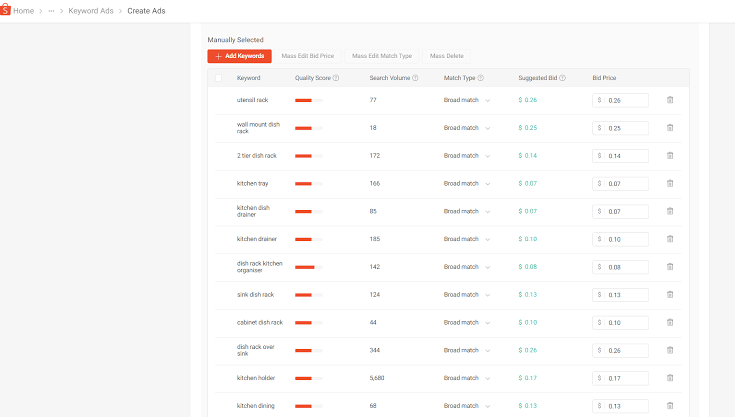
Selecting incorrect search terms is the primary reason store budgets get completely drained while order volume remains at zero. Building a precise shopee ads keyword list ensures your products appear directly in front of buyers with high intent. Fine-tuning each shopee ads keyword based on conversion metrics eliminates junk clicks and protects your profit margins. The RentAds team breaks down a 4-step framework for categorizing e-commerce SEO keywords to help your shop optimize cash flow below.
Categorizing Shopee Ads Keyword Selection by Conversion Goals

Not every high-volume search term generates quality orders. When running campaigns, structure each shopee ads keyword based on its proximity to the buyer’s final purchasing decision to allocate bids and budgets efficiently.
Exact Product Name Keyword Group
This group consists of shoppers who know precisely which item they want to purchase—for instance, “Anessa Perfect UV Sunscreen”, “Deerma DX700 Vacuum Cleaner”, or “Baseus Bluetooth Earphones”. Because buyer intent is high, this category warrants priority budget allocation and competitive bidding.
However, do not judge performance solely on CTR. If a keyword generates heavy click volume but delivers a low conversion rate, audit product pricing, customer reviews, listing imagery, and active promotions before raising bids further.
Solution and Feature Keyword Group
Users in this segment may not have settled on a specific brand or item yet, but are actively seeking solutions for a distinct need—such as “sunscreen for oily skin”, “handheld car vacuum”, or “affordable noise canceling earbuds”.
This group offers clear order expansion potential, though conversion rates and competitive pressure tend to fluctuate. Monitor performance per keyword individually and retain options that generate both steady traffic and valid orders rather than spreading budget too thin.
Brand and Contextual Keyword Group
This category combines brand names, buyer needs, or specific shopping contexts—such as “Anessa official Shopee”, “skincare gifts for women”, or “9.9 sale home appliances”. These terms allow your products to capture shoppers who may not be searching for an exact SKU title directly.
Focus on keywords with clear purchase context rather than adding overly broad terms. During Mega Sale events, expand this keyword pool to align with gift-hunting, sale-seeking, or promotional queries to capture seasonal traffic spikes.
Researching High-Volume Keyword Sets
High-volume terms help expand potential customer reach, but keyword selection should never rely purely on overall popularity. A more effective approach involves analyzing actual Shopee search behavior and cross-referencing competitors to identify terms that balance strong demand with product fit.
Extracting Keywords via Search Suggest
Begin by typing primary product titles, brand names, or core buyer needs directly into the Shopee search bar and recording system auto-suggestions. This source yields valuable insights because suggestions reflect real queries shoppers are actively using.
For example, when optimizing for “sunscreen”, expand your search set to cover angles like sunscreen for oily skin, no-white-cast sunscreen, authentic sunscreen, or budget sunscreen. Filter out terms unrelated to your store’s inventory and retain those showing clear purchase intent.
Reading Monthly Search Volume Metrics
After compiling your list from Search Suggest, import each group into the ad dashboard to cross-evaluate search volume, competition density, and reach potential. You do not need to target every top-volume term; a medium-volume shopee ads keyword that tightly matches your product can deliver far more sales than an overly broad keyword.
Segment your search data into three operational buckets:
- High Volume: Use selectively to expand brand reach and drive baseline traffic.
- Medium Volume: Prioritize for testing, as these terms offer a balanced ratio between demand and competition.
- Low Volume / Niche: Retain if query intent strictly mirrors product specifications and promises high conversion rates.
This structure prevents your entire budget from sinking into a handful of popular keywords plagued by high CPCs and weak closing rates.
Top Competitor Keyword Reverse-Engineering
Rather than merely viewing competitor product catalogs, observe how market leaders structure their content and which buyer queries they target. Audit product titles, categories, variant naming formulas, and recurring keyword patterns on top-ranking listings.
Cross-reference these terms against your current keyword list to uncover missed opportunities or emerging market trends facing low competition. This pool represents ideal candidates for initial campaign testing before scaling budgets on mainstream terms.
Filtering Junk Keywords and Optimizing via CIR

Once your campaign accumulates sufficient data, stop dividing budgets evenly across all terms. Use click volume, total orders, ad spend, and revenue to sort your list into three clear actions: pause, reduce bid, or scale budget.
Pausing Non-Performing Keywords
Filter ad reports by descending click counts and review terms driving traffic without producing sales. Apply a simple benchmark: if a keyword spends an amount equivalent to the net profit of a single order without generating a conversion, mark it for review.
Check actual user search queries before pausing. If shoppers search with correct intent but your listing lacks market competitiveness, lower the bid price. If search queries diverge entirely from your product line, pause or exclude the term to prevent further budget loss.
Scaling Back Budget on Broad Keywords
Calculate the ad cost per order for each keyword and evaluate it against net margin after platform fees and vouchers. For example, if an order yields 60,000 VND in net margin but advertising costs 80,000 VND to generate that order, the term incurs a loss of 20,000 VND per unit.
Instead of turning off the keyword immediately, step down the bid price by 10–20% and shift budget toward specific long-tail terms. If acquisition costs remain above breakeven after several days, pause the keyword. This controlled approach reduces waste without accidentally cutting off converting terms.
Scaling Budget for High-ROAS Keyword Sets
After removing low-performing queries, isolate terms driving steady orders with high ROAS and a CIR safely below your target threshold to receive budget priority. Avoid increasing all targets at once; select keywords showing additional order capacity where rank placement or traffic volume remains under-leveraged.
Raise bids or budgets incrementally by 10–20%, then re-evaluate spend and revenue metrics. If total revenue increases while CIR stays within target limits, continue scaling. If CPC spikes sharply while order volume stays flat, halt bid increases and revert to previous pricing levels.
Contact Info
Information about “Shopee ads keyword” hopes to provide you with additional necessary knowledge. At Rentads, there is a team of highly qualified and experienced staff and experts who will provide google ads agency account for rent as well as support when you run Facebook ads. Contact us via phone number.
Frequently Asked Questions
Do not rely on click count alone. Compare accumulated spend against the net profit margin of a single order. If spend exceeds your acceptable cost benchmark without converting, lower the bid or pause the keyword.
If the keyword produces orders and matches real buyer intent, lower the bid price first to bring acquisition costs under control. If costs remain above breakeven despite bid reductions, pause the term. For keywords that generate empty clicks without conversion value, pausing directly is the better choice.

