Shopee installment plan debit card
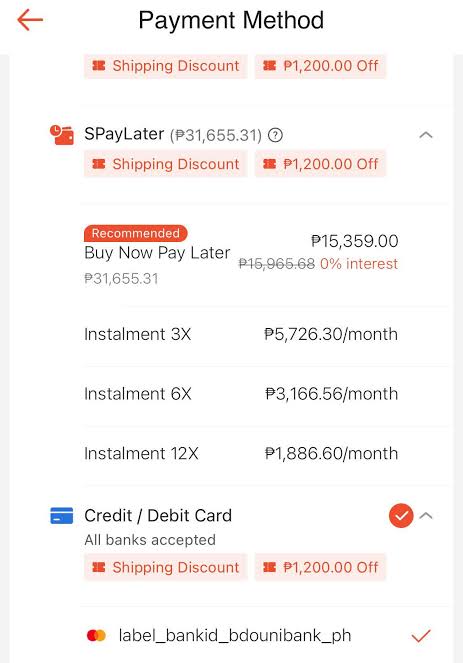
Transaction rejections or errors at checkout often occur when users attempt to select a deferred payment method using an existing payment card. The truth regarding the shopee installment plan debit card functionality lies in the fundamental difference between a bank’s cash flow management mechanism and the e-commerce platform’s automated approval algorithm. Correctly identifying why the system does not support a shopee installment plan debit card saves buyers time and allows them to proactively switch to more flexible payment channels. This detailed guide from RentAds provides a comprehensive perspective along with effective cost-splitting solutions, helping you acquire your favorite items without financial strain.
Technical Reasons Automated Systems Reject a Shopee Installment Plan Debit Card Attempt
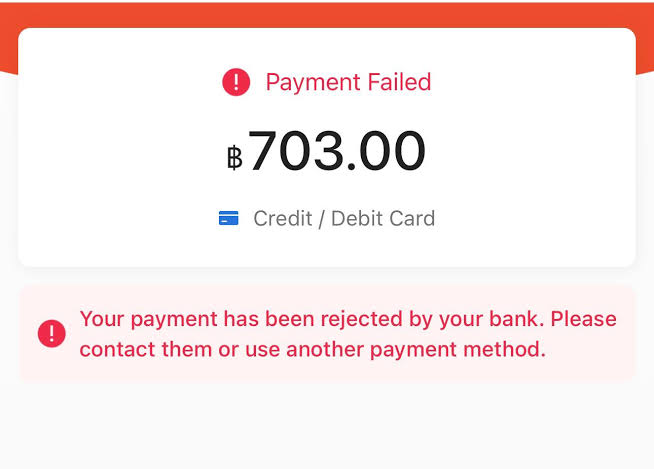
If entering debit card credentials into Shopee’s installment payment flow halts transaction processing, the error rarely stems from a defective physical card. Instead, the limitation lies within fundamental payment processing logic: Shopee mandates that card-based installment programs are strictly restricted to credit cards issued by participating financial partners, whereas debit cards function exclusively as single-charge, direct payment channels.
Debit Cards Lack Revolving Credit Facilities
A debit card links directly to a checking or savings account. Upon executing a purchase, the order total is debited immediately from available account funds. Consequently, to complete a 5,000,000 VND order using a debit card, the cardholder must possess the full balance in their bank account at the moment of checkout.
Credit cards operate differently: issuing banks extend a revolving credit line allowing cardholders to spend upfront and settle balances later. This credit line provides the financial framework for banks to record charges as credit debt and partition total amounts into deferred installment schedules.
The presence of a Visa or Mastercard logo on a debit card does not convert it into an installment-eligible instrument. Card network logos merely signify routing infrastructure; the underlying account type established by the issuing bank dictates whether a card qualifies as a credit instrument eligible for structured repayment plans.
Shopee maintains strict operational segregation between these payment gateways:
- Credit/Debit Card: Executes full, single-charge order payments.
- Credit Card Installment: Processes qualifying transactions through partner banks under structured 0% interest programs.
Shopee’s 0% Installment Plan supports Visa, Mastercard, JCB, or American Express credit cards issued by participating financial institutions.
System Inability to Auto-Convert Debit Transactions
When a buyer executes a payment via a debit card, funds settle immediately as a direct bank transfer. No underlying credit balance remains for the bank to structure into subsequent monthly billing cycles.
By contrast, credit card installment plans represent formal financial agreements supported by issuing banks across eligible transaction sets. Shopee limits installment options strictly to participating banks and approved card tiers, with partner lists and tenure options updating dynamically.
If a buyer inputs debit card details into the installment checkout workflow, the system lacks the financial framework required to construct a 3-, 6-, 9-, or 12-month repayment schedule. This rejection is not an isolated identification error; the submitted payment method falls completely outside supported credit pipelines.
To evaluate installment options for high-ticket items prior to checkout, audit the listing for the official 0% INSTALLMENT tag. Under current platform rules, orders must also hit a net checkout threshold of 3,000,000 VND post-discounts to unlock installment eligibility.
Common Error Indications During Debit Card Checkout
Shopee does not always trigger an explicit error banner stating “Debit cards are ineligible for installments.” Depending on system triggers, the interface may omit the Credit Card Installment option entirely or reject the transaction during final gateway routing.
For standard single-charge card payments, Shopee lists several common rejection causes, including exceeded spending limits, temporary card locks, system incompatibility, or issuer-side restrictions.
When troubleshooting checkout errors, identify your specific scenario:
- Installment Option Missing: Verify if the product listing bears the 0% INSTALLMENT badge and ensure your card is a credit card issued by a participating bank.
- Debit Card Processes Single Payments but Fails for Installments: This represents normal platform behavior, as debit processing and credit installments operate through separate financial pathways.
- Standard Debit Payments Rejected: Audit available bank balance, daily transaction limits, card status, and issuer restriction rules. Contact your bank or Shopee Customer Support if issues persist.
- Incorrect Payment Gateway Selected: Do not complete a single-charge debit transaction expecting to convert it to installments retroactively. You must select Credit Card Installment during initial order placement.
Debit card installment rejections on Shopee stem from foundational banking structures and platform rules rather than card performance errors. To split order costs, buyers must verify card types, issuing institutions, and SKU eligibility prior to confirming orders.
Alternative Installment Guide via SPayLater for Debit Card Holders
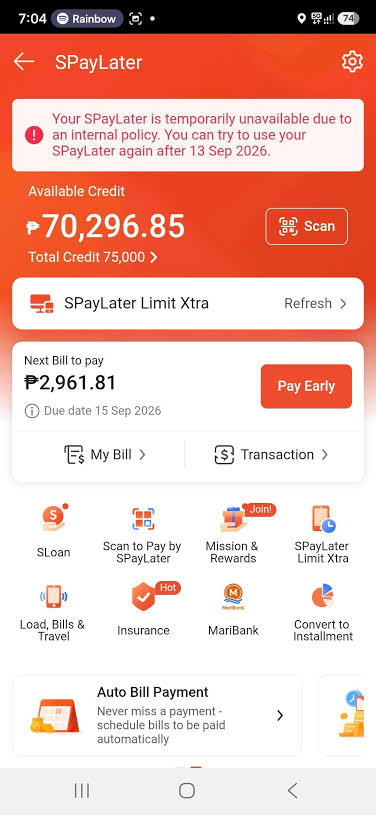
Lacking a credit card does not prevent buyers from accessing deferred payment options on Shopee. Account holders with active eligibility can utilize SPayLater to finance purchases upon approval by partner financial institutions. SPayLater operates via an assigned revolving credit line rather than converting debit card credentials or drawing from checking account balances.
Step 1: Activate SPayLater and Complete Identity Verification
Navigate to Me > SPayLater on the Shopee app and select Activate Now if the feature is enabled for your account. SPayLater registration requires Vietnamese citizenship, an age range of 18 to 55 years, and a valid 12-digit chip-based Citizen Identity Card (CCCD). Applicants must also activate their ShopeePay Wallet to finalize registration.
Verification steps include facial recognition, document capture, and NFC chip scanning depending on individual profile requirements. If prompted for NFC verification, scan your chip-enabled ID in a well-lit environment using the latest version of the Shopee/ShopeePay app.
Set a secure ShopeePay PIN and submit the OTP sent to your registered phone number by the partner bank. Entering this OTP serves as a digital signature confirming the credit agreement with the financial partner.
Step 2: Await Partner Bank Credit Assessment
Partner financial institutions not Shopee evaluate applications and establish spending limits. Approval and assigned credit limits are determined through credit underwriting procedures rather than automated shopping history metrics.
Completing eKYC verification does not guarantee limit assignment. Applications may be approved or declined. Upon approval, your assigned balance renders within the SPayLater dashboard.
Prior to making high-value purchases, review your Available Balance rather than total credit limits. If an order total exceeds available SPayLater credit, eligible users can combine SPayLater with ShopeePay, linked bank accounts, or QR payments to cover remaining balance differences.
Step 3: Select SPayLater and Repayment Terms at Checkout
During checkout, select SPayLater under Payment Method. The interface will display supported tenure options for that specific transaction. SPayLater offers 1-, 2-, 3-, 6-, 12-, 18-, or 24-month terms, though extended tenures (12 to 24 months) are reserved for specific user tiers.
Before tapping Place Order, audit monthly installment amounts and applicable handling fees. Longer repayment tenures reduce monthly outlay but increase total cumulative interest costs. Select tenure options based on total financial obligations rather than monthly installment figures alone.
Certain product categories or merchant stores may not support SPayLater transactions. SPayLater processing will also be blocked if account bills are past due.
Step 4: Authenticate Payment and Audit SPayLater Invoices
After selecting your repayment schedule and reviewing order details, confirm the purchase using your ShopeePay PIN or SMS OTP.
Once the order processes, navigate to SPayLater > My Bills / Payment Schedule to review due dates, principal breakdowns, and active tenure selections. Tracking this dashboard prevents missed billing deadlines.
SPayLater functions as a formal credit line issued by licensed banking partners. Delinquent SPayLater bills may be reported to the National Credit Information Center (CIC), negatively impacting personal credit scores.
For buyers relying solely on debit cards, the proper workflow involves: activating SPayLater -> completing eKYC for bank approval -> selecting SPayLater at checkout -> reviewing fees and total costs -> confirming authentication -> tracking monthly invoices through settlement. Debit cards serve strictly as personal payment tools, not as instruments for converting standard transactions into installments.
Contact Info
Are you in need of Facebook advertising or need to rent a quality Facebook advertising account? Don’t worry! Rentads is a unit specializing in providing reputable Facebook accounts, as well as direct advertising support. Provides all types of advertising accounts such as rent facebook ad account to help you reach and create fast conversions.
Frequently Asked Questions
No. Following identity verification, your application undergoes credit underwriting by partner banks. Completing eKYC does not guarantee approval or a specific credit allocation.
Available tenures depend on your account standing, order parameters, and current platform policies. Shopee supports tenures ranging from 1 to 24 months, though specific options vary by user profile. Review available terms on the checkout screen prior to placing an order.

